Copycan Lite2.7.3
Publisher Description
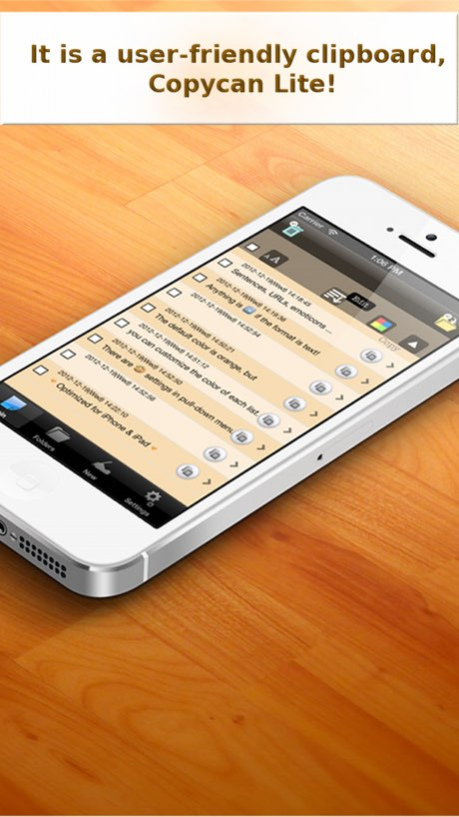
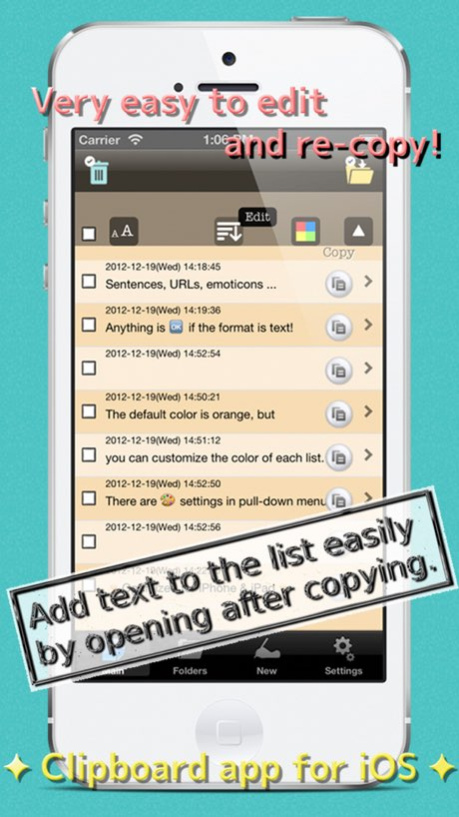
Copycan Lite / User-friendly Clipboard
Do you have useful applications for text copy and paste?
Copycan is a very user-friendly clipboard application for iPhone.
Features;
*Each times the app is launched or back active, it will automatically add copied text to the "Main" screen.
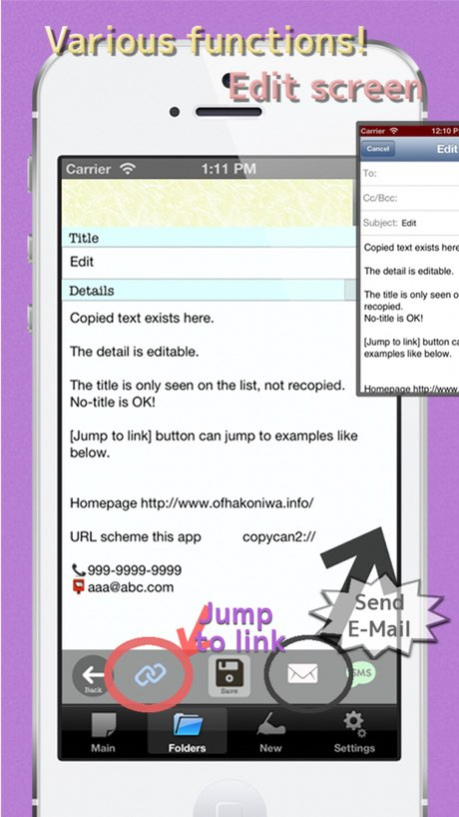
*You can edit, name, send by Email or by SMS the items.
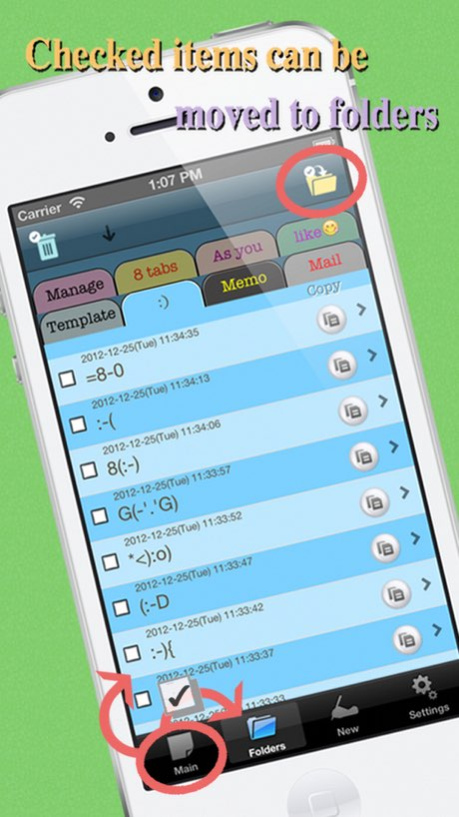
*The items can be categorized into the folders with 8 tabs.
*Sort the list by the most recently used text. You can quickly select and copy the frequently used phrases.
*Intuitive operations; simply tap the buttons from the list.
*Add new text using the "Add new" button.
It's simple and quick.
The app offers great performances. Try to believe.
Custom URL scheme(Later Ver.1.0.4)
copycan2://
PR.
The full version of "Copycan / Clipboard in Background" can record copied text in background.
Version History - Fitting new architecture 2.7.3 09/05/2017 - Changed the design a little
- Bugs were fixed 2.7.2 10/10/2014 Fixed Bugs. 2.7.1 08/27/2013 - Optimized for iPad.
( Changed iOS universal app. )
- Changed icon.
- Changed the overall design.
- Increased the number of tabs in the folders to 8 from 4.
- In pull-down menu of each list, color and font size can be set.
- Added Function of "jump to link" in edit view.
( Telephone number / URL / mail / If you have these in Details, you can jump )
- Added Settings of font size in edit view and new input view.
- Added "Edit by yourself" and "Sort by ABC" to sort settings.
- Added the message setting like banner notification to re-copy by touching on the copy button.
- Added ON / OFF settings of the copy button.
( Setting of OFF
* Copy by touch
* Edit by long press )
- Added ON / OFF settings of moving to the list by touching on the save button in edit view.
- Collective processing of checked items.
( All checked items in multiple lists use collectively for deletion or movement. )
- Added displaying count of deleting. 2.7 06/25/2013 - Optimized for iPhone 5.
- Count the number of characters in new input and editing.
- [Settings][Version]
Add update history.
Add setting of whether or not display detail after updates.
- [Settings][Support]
Add how to backup.
- Change Advertisement.
- Changed Requirements.
Requirements: Requires iOS 4.3 or later.
*** Message from Developer ***
If you liked this app, please review it in the AppStore, please.
Your comments and opinions promote the development of Copycan.
Thanks in advance.
I released a calculator app between this version up from last time.
It is a calculator, "EnterSum", that can calculate the sum of the numbers and formulas more simply.
There is also a free version. Please try it. 2.0 02/26/2013 Sorting bug fixed. 1.0.6 10/09/2012 Bug fixed in usage view and icon. 1.0.5 08/29/2012 Custom URL scheme has been set.
copycan2://
Bug fixed in New Input view for iOS4. 1.0.4 08/02/2012 Bug fixed. 1.0.3 06/22/2012 Change the size of the text input box.
Bug fix. 1.0.2 06/22/2012 Corrected spell. 1.0.1 06/14/2012 1.0 06/07/2012
About Copycan Lite
The company that develops Copycan Lite is Megumi Isozaki. The latest version released by its developer is 2.7.3.
To install Copycan Lite on your iOS device, just click the green Continue To App button above to start the installation process. The app is listed on our website since 2026-10-15 and was downloaded 4 times. We have already checked if the download link is safe, however for your own protection we recommend that you scan the downloaded app with your antivirus. Your antivirus may detect the Copycan Lite as malware if the download link is broken.
How to install Copycan Lite on your iOS device:
- Click on the Continue To App button on our website. This will redirect you to the App Store.
- Once the Copycan Lite is shown in the iTunes listing of your iOS device, you can start its download and installation. Tap on the GET button to the right of the app to start downloading it.
- If you are not logged-in the iOS appstore app, you'll be prompted for your your Apple ID and/or password.
- After Copycan Lite is downloaded, you'll see an INSTALL button to the right. Tap on it to start the actual installation of the iOS app.
- Once installation is finished you can tap on the OPEN button to start it. Its icon will also be added to your device home screen.
Program Details
System requirements
Download information
Pricing
Version History
version 2.7.3
posted on 2026-10-15
Version History - Fitting new architecture 2.7.3 09/05/2017 - Changed the design a little
- Bugs were fixed 2.7.2 10/10/2014 Fixed Bugs. 2.7.1 08/27/2013 - Optimized for iPad.
( Changed iOS universal app. )
- Changed icon.
- Changed the overall design.
- Increased the number of tabs in the folders to 8 from 4.
- In pull-down menu of each list, color and font size can be set.
- Added Function of "jump to link" in edit view.
( Telephone number / URL / mail / If you have these in Details, you can jump )
- Added Settings of font size in edit view and new input view.
- Added "Edit by yourself" and "Sort by ABC" to sort settings.
- Added the message setting like banner notification to re-copy by touching on the copy button.
- Added ON / OFF settings of the copy button.
( Setting of OFF
* Copy by touch
* Edit by long press )
- Added ON / OFF settings of moving to the list by touching on the save button in edit view.
- Collective processing of checked items.
( All checked items in multiple lists use collectively for deletion or movement. )
- Added displaying count of deleting. 2.7 06/25/2013 - Optimized for iPhone 5.
- Count the number of characters in new input and editing.
- [Settings][Version]
Add update history.
Add setting of whether or not display detail after updates.
- [Settings][Support]
Add how to backup.
- Change Advertisement.
- Changed Requirements.
Requirements: Requires iOS 4.3 or later.
*** Message from Developer ***
If you liked this app, please review it in the AppStore, please.
Your comments and opinions promote the development of Copycan.
Thanks in advance.
I released a calculator app between this version up from last time.
It is a calculator, "EnterSum", that can calculate the sum of the numbers and formulas more simply.
There is also a free version. Please try it. 2.0 02/26/2013 Sorting bug fixed. 1.0.6 10/09/2012 Bug fixed in usage view and icon. 1.0.5 08/29/2012 Custom URL scheme has been set.
copycan2://
Bug fixed in New Input view for iOS4. 1.0.4 08/02/2012 Bug fixed. 1.0.3 06/22/2012 Change the size of the text input box.
Bug fix. 1.0.2 06/22/2012 Corrected spell. 1.0.1 06/14/2012 1.0 06/07/2012
version 2.7.3
posted on 2026-09-03
Version History This app has been updated by Apple to prepare for watchOS 27 compatibility. No new features are included.
- Fitting new architecture 2.7.3 09/05/2017 - Changed the design a little
- Bugs were fixed 2.7.2 10/10/2014 Fixed Bugs. 2.7.1 08/27/2013 - Optimized for iPad.
( Changed iOS universal app. )
- Changed icon.
- Changed the overall design.
- Increased the number of tabs in the folders to 8 from 4.
- In pull-down menu of each list, color and font size can be set.
- Added Function of "jump to link" in edit view.
( Telephone number / URL / mail / If you have these in Details, you can jump )
- Added Settings of font size in edit view and new input view.
- Added "Edit by yourself" and "Sort by ABC" to sort settings.
- Added the message setting like banner notification to re-copy by touching on the copy button.
- Added ON / OFF settings of the copy button.
( Setting of OFF
* Copy by touch
* Edit by long press )
- Added ON / OFF settings of moving to the list by touching on the save button in edit view.
- Collective processing of checked items.
( All checked items in multiple lists use collectively for deletion or movement. )
- Added displaying count of deleting. 2.7 06/25/2013 - Optimized for iPhone 5.
- Count the number of characters in new input and editing.
- [Settings][Version]
Add update history.
Add setting of whether or not display detail after updates.
- [Settings][Support]
Add how to backup.
- Change Advertisement.
- Changed Requirements.
Requirements: Requires iOS 4.3 or later.
*** Message from Developer ***
If you liked this app, please review it in the AppStore, please.
Your comments and opinions promote the development of Copycan.
Thanks in advance.
I released a calculator app between this version up from last time.
It is a calculator, "EnterSum", that can calculate the sum of the numbers and formulas more simply.
There is also a free version. Please try it. 2.0 02/26/2013 Sorting bug fixed. 1.0.6 10/09/2012 Bug fixed in usage view and icon. 1.0.5 08/29/2012 Custom URL scheme has been set.
copycan2://
Bug fixed in New Input view for iOS4. 1.0.4 08/02/2012 Bug fixed. 1.0.3 06/22/2012 Change the size of the text input box.
Bug fix. 1.0.2 06/22/2012 Corrected spell. 1.0.1 06/14/2012 1.0 06/07/2012
version 2.7.3
posted on 2026-08-21
Version History This update from Apple will improve the functionality of this app. No new features are included.
- Fitting new architecture 2.7.3 09/05/2017 - Changed the design a little
- Bugs were fixed 2.7.2 10/10/2014 Fixed Bugs. 2.7.1 08/27/2013 - Optimized for iPad.
( Changed iOS universal app. )
- Changed icon.
- Changed the overall design.
- Increased the number of tabs in the folders to 8 from 4.
- In pull-down menu of each list, color and font size can be set.
- Added Function of "jump to link" in edit view.
( Telephone number / URL / mail / If you have these in Details, you can jump )
- Added Settings of font size in edit view and new input view.
- Added "Edit by yourself" and "Sort by ABC" to sort settings.
- Added the message setting like banner notification to re-copy by touching on the copy button.
- Added ON / OFF settings of the copy button.
( Setting of OFF
* Copy by touch
* Edit by long press )
- Added ON / OFF settings of moving to the list by touching on the save button in edit view.
- Collective processing of checked items.
( All checked items in multiple lists use collectively for deletion or movement. )
- Added displaying count of deleting. 2.7 06/25/2013 - Optimized for iPhone 5.
- Count the number of characters in new input and editing.
- [Settings][Version]
Add update history.
Add setting of whether or not display detail after updates.
- [Settings][Support]
Add how to backup.
- Change Advertisement.
- Changed Requirements.
Requirements: Requires iOS 4.3 or later.
*** Message from Developer ***
If you liked this app, please review it in the AppStore, please.
Your comments and opinions promote the development of Copycan.
Thanks in advance.
I released a calculator app between this version up from last time.
It is a calculator, "EnterSum", that can calculate the sum of the numbers and formulas more simply.
There is also a free version. Please try it. 2.0 02/26/2013 Sorting bug fixed. 1.0.6 10/09/2012 Bug fixed in usage view and icon. 1.0.5 08/29/2012 Custom URL scheme has been set.
copycan2://
Bug fixed in New Input view for iOS4. 1.0.4 08/02/2012 Bug fixed. 1.0.3 06/22/2012 Change the size of the text input box.
Bug fix. 1.0.2 06/22/2012 Corrected spell. 1.0.1 06/14/2012 1.0 06/07/2012
version 2.7.3
posted on 2017-09-05
Sep 5, 2017 Version 2.7.3
This app has been updated by Apple to display the Apple Watch app icon.
- Fitting new architecture
version 2.7.3
posted on 2017-09-05
5 Sep 2017 Version 2.7.3
- Fitting new architecture
version 2.7.3
posted on 2017-09-05
Sep 5, 2017 Version 2.7.3
- Fitting new architecture
version 2.7.3
posted on 2017-09-05
Sep 5, 2017 Version 2.7.3
This app has been updated by Apple to use the latest Apple signing certificate.
- Fitting new architecture
version 2.7.3
posted on 2017-09-05
This app has been updated by Apple to display the Apple Watch app icon.
- Fitting new architecture
version 2.7.2
posted on 2012-06-14
version 2.7.3
posted on 1970-01-01
2017年9月5日 Version 2.7.3
- Fitting new architecture
